Kafka Explained Like You’re 5: Events, Partitions, and Consumer Groups
How does a large application process millions of events every day? Distributed event streaming explained simply.

How does a large application process millions of events every day?
Picture a food delivery app on a Friday night. Thousands of orders are being placed, restaurants are accepting them, delivery drivers are being assigned, payments are being charged, and notifications are pinging everyone’s phone — all at once, all the time.
No single piece of code “handles” all of that directly. Instead, modern systems break it into small facts — “order placed,” “payment confirmed,” “driver assigned” — called events, and let many independent parts of the system react to those facts as they happen. Apache Kafka is the tool most large systems use to move that flood of events around, reliably, at massive scale. This is Kafka, explained from the ground up — like you’re 5, but by the end, you’ll understand it like an engineer.
1. Why Systems Need Event Streaming
Traditional request-response communication
The classic way two systems talk is request-response: Service A directly calls Service B, waits for an answer, and only then continues. Simple, and fine for small setups.
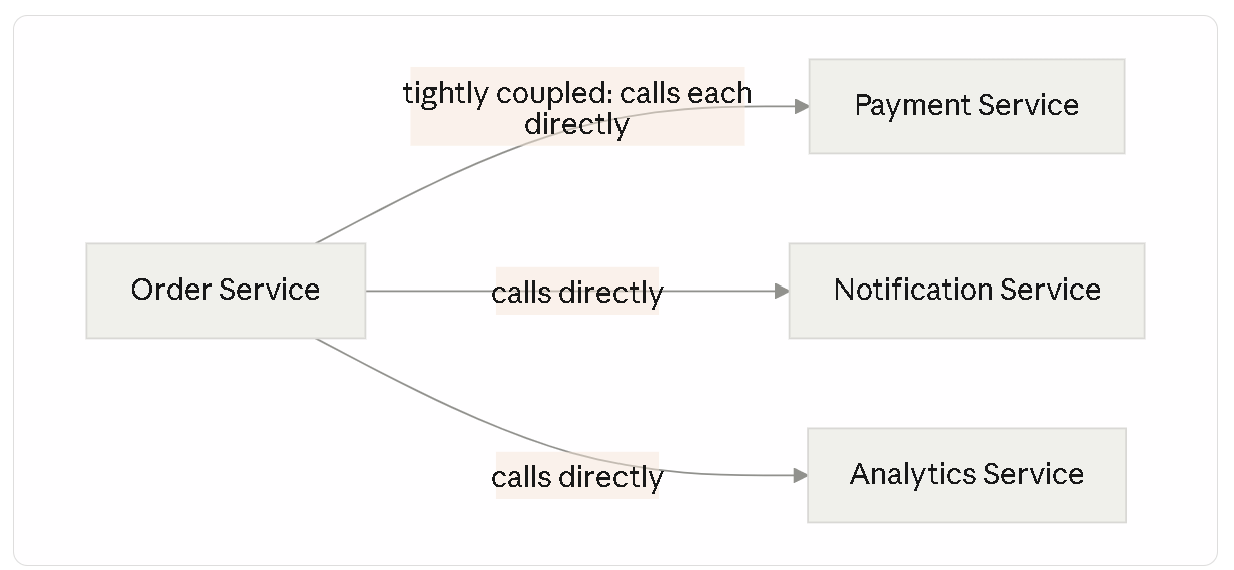
Problems with tightly coupled systems
Now imagine an order-processing service that has to directly call the payment service, the notification service, the analytics service, the inventory service, and the delivery-assignment service — every single time an order is placed. If any one of those five is slow or down, the whole order can get stuck. This is called tight coupling, and it gets worse the more services you add.
What happens when applications grow
As a company grows, the number of things that need to “know” about an order growing keeps increasing — new teams build new features that all care about the same event. Wiring up more and more direct, synchronous calls between services becomes fragile and slow to change.
Why modern systems use events
Instead of Service A calling every interested service directly, Service A simply announces: “an order was placed.” Any service that cares — payments, notifications, analytics, whoever — can listen for that announcement and react on its own, without Service A ever needing to know they exist.
Real-world examples of event-driven systems
- A food delivery app announcing “order placed” — triggering restaurant notification, payment processing, and driver matching independently
- An e-commerce platform announcing “payment completed” — triggering order confirmation emails, inventory updates, and fraud checks in parallel
- A social media app announcing “post published” — triggering feed updates, notification delivery, and content moderation checks simultaneously

2. What is Kafka?
High-level overview of Kafka
Apache Kafka is a platform that lets different parts of a system publish events and lets other parts subscribe to and process those events — reliably, in order, at very high volume.
Why Kafka was created
Kafka was originally built at LinkedIn to handle the sheer volume of activity data — clicks, views, updates — flowing through the platform, when traditional messaging tools of the time couldn’t keep up with that scale.
Event streaming platform concept
Think of Kafka as a shared, durable “notice board” that many services can post announcements to, and many other services can read announcements from — except this notice board never forgets what was posted, and can handle millions of postings a second.
How Kafka differs from traditional queues
A traditional message queue typically hands a message to one consumer and then deletes it. Kafka instead keeps events around for a configurable period (sometimes indefinitely), and lets multiple, independent consumers read the same events at their own pace — a distinction covered in depth in Section 9.
Common Kafka use cases
Real-time analytics, activity tracking, payment pipelines, notification systems, and connecting many independent microservices without wiring them together directly.
3. Understanding Events
What an event is
An event is simply a fact that something happened, at a specific point in time — a small, immutable record. Not a request for something to happen — a statement that it already did.
Producers generating events
A producer is anything that creates and sends events into Kafka — an order service producing an “order placed” event, for instance.
Consumers processing events
A consumer is anything that reads events from Kafka and reacts to them — a notification service reading “order placed” events and sending a confirmation text.
Event lifecycle
- Something happens in the real world (a user places an order)
- A producer creates an event describing that fact
- Kafka stores the event
- One or more consumers read and react to it

Examples
- User signup — a new account was created; welcome emails, onboarding flows, and analytics can all react independently
- Order creation — an order was placed; inventory, payment, and confirmation systems each pick it up
- Payment completion — a charge succeeded; order status updates and receipt emails both trigger from the same event
- Notifications — a push notification needs to go out, triggered by any of the above events without those services needing to know how notifications actually get delivered
4. Topics in Kafka
What a topic is
A topic is a named category events get published to — think of it as a labeled folder for one kind of announcement, like orders, payments, or signups.
Why topics exist
Without topics, every event would be dumped into one giant, undifferentiated stream — consumers would have to sift through everything to find what they actually care about. Topics let producers and consumers agree on where a particular kind of event lives.
Organizing events
A food delivery app might have separate topics: order-placed, payment-completed, driver-assigned, delivery-completed — each one a clean, focused stream of just that kind of fact.
Event categorization
Keeping topics focused on one category of event keeps consumers simple — a payment service can subscribe only to payment-completed, without needing to filter out irrelevant events.
Multiple producers and consumers
Many different producers can write to the same topic (multiple app servers producing to order-placed), and many different consumers can read from it — Kafka doesn't require a one-to-one relationship between producers and consumers.

5. Partitions Explained
Why partitions exist
A single topic could, in theory, be handled by one machine — but that becomes a bottleneck the moment event volume grows large. Partitions split a topic’s events across multiple independent, ordered logs, so the work can be spread across multiple machines.
Splitting work across partitions
Think of a topic like order-placed as a filing cabinet split into several drawers (partitions). Each incoming event gets placed into one specific drawer, usually based on something like the order's ID.
Ordering guarantees
Kafka guarantees order within a single partition — events in partition 0 arrive at consumers in the exact order they were written. It does not guarantee order across partitions of the same topic — a tradeoff made deliberately, in exchange for the ability to parallelize.
Parallel processing
Because each partition is an independent, ordered log, different partitions can be read and processed in parallel, by different consumers — this is the core mechanism behind Kafka’s scalability.
Scaling Kafka using partitions
Need more throughput? Add more partitions to a topic, and more consumers can work on it simultaneously. Partitions are the dial Kafka gives you for horizontal scale.

6. Why Kafka is Fast
Sequential writes
Kafka writes new events to the end of a partition’s log, one after another — never rewriting or reshuffling existing data. Sequential writes are dramatically faster than random-access writes on disk, even on ordinary spinning disks.
Append-only logs
Each partition is essentially an append-only log file — new events are added to the end, and existing events are never modified in place. This simplicity is a major source of Kafka’s speed and reliability.
Disk performance
Because of sequential writes, Kafka can achieve performance on regular disks that rivals what you’d expect only from memory-based systems for many workloads — a deliberate design choice that keeps storage cheap while keeping throughput high.
Efficient storage
Kafka also batches events together and compresses them efficiently, further reducing the physical work needed to store and transmit large volumes of events.
High throughput architecture
The combination — sequential append-only writes, batching, and parallelism via partitions — is why Kafka can comfortably handle millions of events per second across a cluster, which is exactly the workload it was built for.
7. Consumer Groups
What consumer groups are
A consumer group is a set of consumers working together to process a topic’s events as a team — Kafka automatically divides the topic’s partitions among the members of the group.
Why consumer groups exist
If a topic has three partitions and only one consumer, that one consumer must process all three, one after another. A consumer group lets multiple consumers split that work — each handling a different subset of partitions.
Work distribution
With three partitions and three consumers in the same group, Kafka assigns each consumer exactly one partition — they process events in parallel, each responsible for its own slice.

Scaling consumers
Need to process events faster? Add more consumers to the group — up to the number of partitions the topic has. (Beyond that point, extra consumers simply sit idle, since there aren’t more partitions left to assign them.)
Fault tolerance
If one consumer in a group crashes, Kafka reassigns its partitions to the remaining consumers in the group — processing continues without that partition being abandoned.
Rebalancing concept
Rebalancing is the process where Kafka redistributes partitions among a consumer group’s members — triggered when a consumer joins, leaves, or crashes. It’s how the group stays correctly balanced as its membership changes, though frequent rebalancing can briefly pause processing, which is why group membership is usually kept relatively stable in production.
A key point often misunderstood: a partition is only ever consumed by one consumer within the same group at a time — but a completely different consumer group (say, an analytics team’s separate group) can independently read the exact same partition from the beginning, at its own pace, without interfering with the first group at all.
8. Kafka Architecture
Putting the pieces together:
- Producers — services that publish events to topics
- Brokers — the Kafka servers that store partitions and serve them to consumers; a Kafka cluster is made of multiple brokers working together
- Topics — named categories of events
- Partitions — ordered, independent logs that make up a topic, spread across brokers
- Consumers — services that read and process events
- Consumer groups — teams of consumers sharing the work of a topic

9. Kafka vs Traditional Message Queues
Queue model
A traditional queue (like classic RabbitMQ usage) typically delivers each message to exactly one consumer, and removes it once processed — a straightforward “task distribution” model.
Event streaming model
Kafka instead treats events as a durable, replayable log that multiple independent consumer groups can each read in full, at their own pace, without one group’s reading affecting another’s.
Data retention
Traditional queues generally discard a message right after it’s successfully processed. Kafka retains events for a configurable period (hours, days, or indefinitely) — regardless of whether they’ve already been consumed.
Replayability
Because Kafka retains events, a new consumer (say, a newly built analytics service) can read a topic’s entire history from the beginning — something a traditional queue’s “delete after delivery” model simply doesn’t support.
Scalability differences
Kafka’s partition-based parallelism is built specifically for very high-throughput, high-volume event streams — while traditional queues are often optimized more for flexible routing and per-message task distribution at more moderate volumes.

10. Real-World Applications of Kafka
Analytics systems
Every user click, page view, and interaction can be published as an event and consumed independently by analytics pipelines — without slowing down the actual user-facing application.
Notification systems
A single “something happened” event (an order shipped, a comment received) can trigger email, push, and SMS notification services simultaneously, each consuming the same event independently.
Payment processing
Payment events flow through Kafka to trigger fraud checks, ledger updates, and receipt generation in parallel, with Kafka’s durability ensuring no payment event gets silently lost.
User activity tracking
Social media feeds, recommendation systems, and engagement analytics all commonly consume the same underlying stream of user-activity events, each for its own purpose.
Recommendation engines
A recommendation engine can continuously consume a stream of “user viewed product X” events to keep its model of user interests up to date, without querying the main application database directly.
Microservices communication
Kafka is a common backbone for event-driven microservices — letting dozens of independent services coordinate through shared events instead of a tangle of direct service-to-service calls.
11. Building Systems with Kafka
Event-driven architecture
Designing around events — “what happened” — rather than direct commands — “do this now” — is the core architectural shift Kafka enables. Services publish facts; interested services react independently.
Decoupling services
Because producers don’t need to know who’s consuming their events, teams can add entirely new consumers (a new analytics dashboard, a new notification channel) without ever touching the producing service’s code.
Reliability benefits
Kafka’s durable, replayable log means that even if a consumer is temporarily down, it can catch up on everything it missed once it comes back — nothing is silently lost the way it might be in a simple direct-call architecture.
Scalability benefits
Partitions and consumer groups together let a system scale its event processing horizontally — simply by adding more partitions and more consumers, rather than needing a single, ever-larger machine.
Handling large workloads
This combination — decoupling, durability, and horizontal scale — is exactly why systems processing millions of events daily (large e-commerce platforms, social networks, ride-sharing apps) lean on Kafka or similar event-streaming platforms as core infrastructure.
Final Takeaway
Strip away the terminology, and Kafka is a fairly simple idea taken very seriously: let services announce facts instead of calling each other directly, keep those facts around instead of throwing them away, and split the work of processing them across partitions and consumer groups so it can scale. Events are the facts. Topics organize them. Partitions make them parallelizable. Consumer groups make processing them a team effort. Put together, that’s how a food delivery app — or any large system — keeps up with millions of things happening at once, without everything grinding to a halt.
Frequently Asked Questions
Is Kafka a database?
> Not in the traditional sense. Kafka stores events durably and can retain them for a long time, but it’s designed around streaming and sequential reads, not the flexible querying a traditional database supports.
Do I need Kafka for a small application?
> Usually not. Kafka’s strengths — massive throughput, decoupled services, replayable history — matter most once an application has real scale or genuinely independent services that need to react to the same events. Smaller applications are often better served by simpler tools.
What happens if a consumer falls behind?
> Kafka retains events for its configured retention period, so a slower or temporarily offline consumer can catch up once it resumes, as long as it reads the backlog before that retention window expires.
Can two different teams use the same Kafka topic independently?
> Yes — this is one of Kafka’s key strengths. Two separate consumer groups can each read the same topic from the beginning, entirely independently, without either one affecting the other’s progress.
Originally published by Mr Madhukar
Read the complete article on Medium with full formatting & reader responses.