Prisma vs Drizzle: A Complete Guide to Databases, ORMs, and Choosing the Right Tool
A practical, no-hype comparison of Prisma and Drizzle — plus everything you need to know about databases, ORMs, and migrations first.

Where does your data live after you close the app?
Open Instagram, like a post, then force-close the app. Open it again tomorrow — the like is still there.
Where did it go while the app was closed? It didn’t stay in your phone’s memory. It didn’t stay in Instagram’s server RAM. It went somewhere that survives crashes, restarts, and power cuts: a database.
That one question — “where does the data live when nothing is running?” — is the starting point for everything in this guide: why databases exist, why raw queries become painful at scale, what an ORM actually does, and how two of today’s most talked-about tools, Prisma and Drizzle, solve the same problem in very different ways.
1. Why Applications Need Databases
Memory is temporary. Data needs to be permanent.
Every running application keeps some data in RAM — fast, but volatile. The moment the process stops, that memory is wiped. If your app only used RAM, every user, every order, every message would vanish the instant the server restarted.
Applications need a place to store data that:
- Survives restarts — a server reboot shouldn’t delete your orders
- Survives crashes — a bug shouldn’t erase your users
- Can be queried — you need to find one user among a million, not scan them all
- Can be shared — multiple servers need to see the same, consistent data
That place is the database — a system purpose-built for persistent, structured, queryable storage.
Structured vs. unstructured data
- Structured data fits a predictable shape — rows and columns, or fixed fields. A user always has an email, a name, a signup date. Think spreadsheets.
- Unstructured (or semi-structured) data doesn’t follow a rigid shape — a product review, a chat log, a JSON blob with optional fields that vary from record to record.
Most real applications have both. A product might have fixed fields (price, SKU) and a flexible specifications object that differs by category.
The building blocks of almost every app

The database’s role in a modern application
In any modern stack — a MERN app, a Django backend, a Spring Boot service — the database is the single source of truth. The application layer (your Express routes, your React components, your business logic) is stateless and disposable. It can restart, redeploy, or scale to ten instances. The database is the one component that must never lose track of what’s real.

2. SQL vs NoSQL Databases
Once you accept that data must be persisted, the next question is: persisted how? This is where SQL and NoSQL databases diverge.
SQL databases (Relational)
SQL databases organize data into tables with fixed rows and columns, connected through relationships (foreign keys). They’re built on decades of relational theory and enforce a strict schema — every row in the users table has the same columns.
Examples: PostgreSQL, MySQL, SQLite, Microsoft SQL Server
Relational data means entities are linked by keys instead of duplicated. An orders table doesn't repeat the user's full profile — it stores a user_id that points back to the users table.
NoSQL databases (Document-based and beyond)
NoSQL databases store data in flexible formats — most commonly as JSON-like documents — without enforcing a rigid schema across records. One product document can have five fields; another can have twelve.
Examples: MongoDB (document), Redis (key-value), Cassandra (wide-column), Neo4j (graph)
Document-based data groups related information into a single nested object instead of splitting it across tables — a blog post document might embed its comments directly.

When to choose each

Reality check: most production systems today aren’t purely one or the other. An e-commerce platform might use PostgreSQL for orders and payments (where consistency is non-negotiable) and Redis for session caching or MongoDB for a product-review feed (where flexibility matters more).
3. The Problem with Raw Database Queries
Every application eventually needs to talk to its database. The most direct way is writing raw queries by hand.
SELECT * FROM users WHERE email = 'test@example.com';
This works fine — once. The problems appear as the application grows.
Repetitive code
Almost every table needs the same operations: create, read, update, delete. Hand-writing a slightly different version of the same INSERT/SELECT/UPDATE for every entity — users, orders, products, payments — means the same logic gets rewritten dozens of times, with dozens of chances to introduce a typo or inconsistency.
Security concerns
String-concatenated queries are the classic entry point for SQL injection — one of the oldest and still most common web vulnerabilities:
// Dangerous: user input goes straight into the query string
db.query(`SELECT * FROM users WHERE email = '${userInput}'`);
A malicious userInput can rewrite the entire query. Preventing this manually requires careful, disciplined parameterization on every single query, everywhere, forever — a fragile guarantee in a large codebase.
Maintainability issues
Raw SQL scattered across dozens of files makes two things painful:
- Refactoring — rename a column, and now you’re grepping the whole codebase for every raw string that mentions it
- Understanding intent — SQL strings don’t get autocomplete, type hints, or compile-time checks; mistakes surface at runtime, in production
Scaling database operations
As traffic grows, you need connection pooling, query batching, transaction management, and read/write splitting. Rebuilding all of this by hand, per project, is a significant and repeated engineering cost — one that most teams shouldn’t be paying over and over.
This combination of pain points — repetition, security risk, fragility, and scaling overhead — is exactly the gap an ORM is built to fill.
4. What is an ORM?
ORM stands for Object-Relational Mapper. It’s a library that translates between two different worlds:
- The world of your application code — objects, classes, functions
- The world of your database — tables, rows, foreign keys
Instead of writing SQL strings, you write code:
const user = await db.user.create({
  data: { name: "Aarav", email: "aarav@example.com" },
});
Behind the scenes, the ORM generates and executes the correct, safely-parameterized SQL.
Why ORMs exist
ORMs exist to remove the friction identified in the previous section — without removing your control over the data model. They give you:
- A single, consistent API for CRUD operations across every table
- Automatic parameterization, closing off the most common SQL injection paths
- Objects that mirror your domain — a
Userobject with.orders, not a manually joined result set
Mapping code objects to database records
This is the “O-R” part of ORM. A users table row becomes a User object in your code, with its columns as properties and (often) its relationships as nested objects or methods:

Benefits of ORMs
- Faster development — less boilerplate per entity
- Safer by default — parameterized queries baked in
- Portable — many ORMs support switching the underlying database with minimal code change
- Discoverable — autocomplete and type checking instead of memorizing table structures
Tradeoffs of using ORMs
ORMs are productivity tools, not magic — and they come with real tradeoffs:
- Abstraction cost — a generated query is sometimes less efficient than a hand-tuned one
- Learning curve — you now need to understand both SQL and the ORM’s own conventions
- Leaky abstractions — complex queries (deep joins, window functions) sometimes still need raw SQL escape hatches
- N+1 query risk — careless use of relationship-loading can silently generate hundreds of queries instead of one
Understanding an ORM as a productivity layer over SQL, not a replacement for understanding databases, is the mindset that prevents most of these problems.
5. Understanding Prisma
Prisma is a modern ORM for Node.js and TypeScript, built around a schema-first workflow and strong type safety.
Schema-first development
In Prisma, you define your data model in a dedicated file, schema.prisma, using Prisma's own readable schema language:
model User {
  id     Int     @id @default(autoincrement())
  email  String  @unique
  name   String?
  orders Order[]
}

model Order {
  id     Int   @id @default(autoincrement())
  total  Float
  user   User  @relation(fields: [userId], references: [id])
  userId Int
}
This single file becomes the source of truth for your database structure. Prisma then generates everything else — client code, types, and migrations — from it.
Type-safe database access
Prisma generates a fully typed client based on your schema. Your editor knows, at compile time, that order.total is a number and user.email is a string — catching mistakes before the app ever runs.
Migrations
Prisma Migrate reads the difference between your schema file and your actual database, then generates the SQL needed to bring the database in line — tracked as versioned migration files your team commits to source control.
Developer experience benefits
- Prisma Studio — a visual, browsable GUI for your data
- Auto-generated, richly typed client
- Clear error messages and strong editor autocomplete
- A large, well-documented ecosystem
Prisma ecosystem overview
Prisma includes the ORM client, Prisma Migrate, Prisma Studio, and integrations for most popular databases (PostgreSQL, MySQL, SQLite, MongoDB, SQL Server). It has become a default choice in much of the Node.js and MERN-adjacent ecosystem because of how quickly a new developer can become productive with it.
6. Understanding Drizzle
Drizzle is a newer, lightweight TypeScript ORM built around a fundamentally different philosophy: stay as close to SQL as possible.
SQL-first philosophy
Instead of a separate schema language, Drizzle defines your schema directly in TypeScript, and its query syntax deliberately mirrors SQL itself:
export const users = pgTable("users", {
  id: serial("id").primaryKey(),
  email: text("email").notNull().unique(),
  name: text("name"),
});

const result = await db
  .select()
  .from(users)
  .where(eq(users.email, "aarav@example.com"));
If you already know SQL, Drizzle’s query builder often reads like SQL translated line-by-line into TypeScript.
Type safety
Because the schema is plain TypeScript, types are inferred directly from your table definitions — no separate code-generation step required. Change the schema, and your types update immediately.
Lightweight architecture
Drizzle has no separate query engine or binary running alongside your app — it compiles down to SQL and talks to standard database drivers directly. This keeps its runtime footprint small and its query execution close to raw SQL performance.
Drizzle vs. traditional ORMs
Drizzle intentionally avoids heavy abstraction. There’s no hidden query planner deciding how to fetch relations — you largely write what you mean, and it largely runs what you wrote. This appeals to teams who want an ORM’s convenience without giving up SQL’s predictability.
7. Prisma vs. Drizzle: An Objective Comparison
Neither tool is strictly “better.” They optimize for different priorities.


The honest tradeoff
- Prisma trades a little raw performance and flexibility for a smoother, more guided developer experience.
- Drizzle trades some hand-holding for speed, transparency, and staying closer to the SQL you already understand.
Neither choice is wrong — they represent two different bets on what makes a team productive.
8. Database Migrations
Why migrations are needed
Applications evolve. You launch with a simple users table, and six months later you need to add phone_number, split name into first_name/last_name, and add a whole new payments table. Migrations are the versioned, repeatable way to apply these schema changes safely — in development, staging, and production — without manually editing a live database by hand.
Schema evolution
Every migration is a small, incremental step: “add this column,” “create this table,” “add this index.” Applied in order, they turn an empty database into today’s exact schema — and can (mostly) be reversed if something goes wrong.
Versioning database changes
Just like Git tracks changes to code, migration files track changes to your schema. They’re committed to source control, reviewed in pull requests, and applied automatically as part of deployment — so every environment, from a new developer’s laptop to production, ends up with an identical structure.
Migration workflows
Both Prisma and Drizzle follow a similar pattern:
- Change the schema definition in code
- Generate a migration file (the tool diffs old vs. new schema)
- Review the generated SQL
- Apply the migration to the target database
Common migration challenges
- Data loss risk — dropping or renaming a column can destroy existing data if not handled carefully
- Downtime — large table changes on a live production database can lock tables and slow the app
- Drift — manual, undocumented changes to a production database that migration history doesn’t know about
- Team coordination — two developers generating conflicting migrations at the same time

9. Designing Data Models
Good schema design starts with identifying entities (the “nouns” of your system — User, Order, Product) and the relationships between them.
One-to-One
Each record in Table A relates to exactly one record in Table B. Example: a User and their UserProfile (bio, avatar, preferences) — kept separate for organization, but strictly paired.

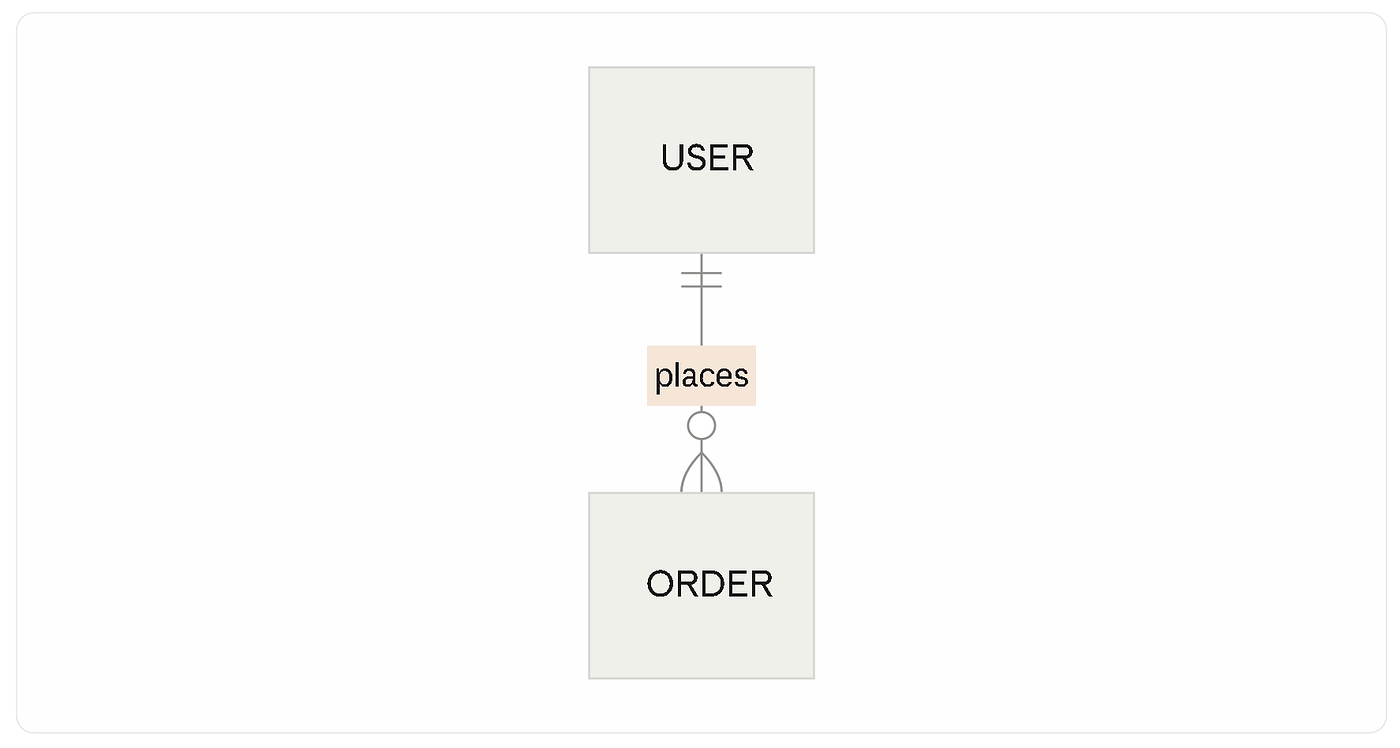
One-to-Many
One record in Table A relates to many records in Table B. Example: one User places many Orders, but each Order belongs to exactly one User.
Many-to-Many
Records in Table A can relate to many records in Table B, and vice versa. Example: a Product can appear in many Orders, and an Order can contain many Products — usually implemented with a join table like OrderItems.

Modeling real-world systems
E-commerce: User → Order (one-to-many) → OrderItem ↔ Product (many-to-many via join table) → Payment (one-to-one with Order)
Social media: User ↔ User via Follow (many-to-many, self-referential) → Post (one-to-many from User) → Comment (one-to-many from Post)
Blogging platform: Author → Post (one-to-many) → Tag ↔ Post (many-to-many) → Comment (one-to-many from Post)
The pattern repeats everywhere: identify the nouns, then decide whether each connection is one-to-one, one-to-many, or many-to-many. Everything else — the ORM, the SQL, the migrations — is implementation detail layered on top of this decision.
10. Choosing the Right Tool
There’s no universal winner between SQL and NoSQL, or between Prisma and Drizzle. The right choice depends on context.
Startup projects
Speed matters more than perfect architecture early on. Prisma’s guided workflow and Studio GUI often help small teams ship faster with fewer early mistakes. NoSQL databases can also suit early-stage products with rapidly changing data shapes.
Enterprise applications
Consistency, auditability, and long-term stability matter more than raw speed of initial development. SQL databases dominate here, and either Prisma or Drizzle can work — the deciding factor is usually team familiarity and existing infrastructure.
Team experience
A team full of SQL experts will likely feel at home with Drizzle’s SQL-first approach. A team newer to databases may prefer Prisma’s abstractions and guardrails.
Long-term maintenance
Consider who maintains this code in two years. Prisma’s generated client and migration history are easy to onboard new developers onto. Drizzle’s closeness to SQL means anyone who already knows SQL can read the codebase with almost no ORM-specific ramp-up.
Performance requirements
For most applications, either tool performs well enough that this isn’t the deciding factor. For latency-sensitive, high-throughput systems, Drizzle’s thinner abstraction layer can offer a measurable edge.
Final Takeaway
Every architectural decision in this stack — SQL vs. NoSQL, raw queries vs. ORM, Prisma vs. Drizzle — comes down to the same underlying tradeoff: how much control do you want to keep, versus how much convenience are you willing to trust to a tool?
Understanding why each layer exists — persistence, structure, safety, developer productivity — matters more than memorizing any single tool’s syntax. Tools change. The underlying problem they solve doesn’t.
Frequently Asked Questions
Is Prisma better than Drizzle?
>Neither is universally better. Prisma favors guided developer experience and tooling; Drizzle favors SQL-closeness and a lighter runtime. The right choice depends on team background and project needs.
Do I need an ORM to build a full-stack app?
>No — raw SQL or a query builder works fine for small projects. ORMs become valuable as an application’s number of entities, developers, and queries grows.
Should I learn SQL before learning an ORM?
> Yes. Every ORM ultimately generates SQL. Understanding SQL first makes it much easier to reason about what an ORM is doing — and to debug it when something goes wrong.
Can I use Prisma or Drizzle with MongoDB?
>Prisma has official MongoDB support. Drizzle is currently focused primarily on SQL databases (PostgreSQL, MySQL, SQLite).
Originally published by Mr Madhukar
Read the complete article on Medium with full formatting & reader responses.